A focused audit for a quiet source of sprawl
Notification schemes accumulate over time. Copies diverge by one recipient, obsolete schemes remain assigned nowhere, and risky recipients become harder to review as a Jira site grows. Notification Hygiene turns that configuration into deterministic, prioritized findings.
Group exact duplicates
Identify schemes with identical event and recipient configuration.
Compare near duplicates
See event and recipient additions and removals between similar schemes.
Surface configuration risks
Flag inactive users, direct-email recipients, and duplicate recipient rows.
Find unassigned schemes
Identify schemes without company-managed project assignments.
Monitor daily drift
Review added, removed, or changed schemes in bounded Forge-hosted history.
Copy audit reports
Copy a plain-text summary for review without external data transfer.
Setup and first use
Notification Hygiene is a Jira Cloud app hosted entirely on Atlassian Forge. No Korinvale account, API token, callback URL, external service, or separate configuration is required.
- Install from Atlassian Marketplace
Choose Try it free on the Marketplace listing, select the Jira Cloud site to install on, and approve the requested permissions as a site administrator. Billing and evaluation are handled by Atlassian.
- Open the Jira admin app
In Jira, open Apps and select Notification Hygiene. The page is available to users with Jira's ADMINISTER global permission.
- Run the first audit
Select Run audit. The app reads the notification schemes and company-managed project mappings that Jira authorizes for the signed-in administrator. It does not change Jira configuration.
- Review the findings
Start with exact duplicates, then inspect near duplicates, recipient risks, and unassigned schemes. Every result is advisory; make any approved change in Jira administration.
- Use Drift for ongoing review
The first successful audit creates a compact baseline. A Forge-hosted daily scan compares later scheme fingerprints, and the Drift tab shows the last completed scan and bounded change history.
A Jira notification-scheme audit checklist
Use the first audit as a configuration review, then use daily drift to spot later changes. Duplicate configuration is a review signal, not proof that someone received duplicate email.
- Confirm the scope. Review the schemes and company-managed project assignments covered by the audit. An unassigned scheme is not automatically safe to remove.
- Compare exact and near duplicates. Check whether different project requirements justify separate schemes. Inspect event and recipient differences before consolidating anything.
- Check recipient intent. Review duplicate rows, inactive users, and direct-email recipients with the responsible administrator. Keep required recipients and escalation paths intact.
- Record a decision. Copy the report into your internal review process. Make approved changes in Jira, then rerun the audit and review the Drift tab.
The app does not analyze mail delivery, inboxes, or actual notification volume. It does not automatically reduce email. Validate any email-related outcome separately in your own authorized process.
Run the first audit
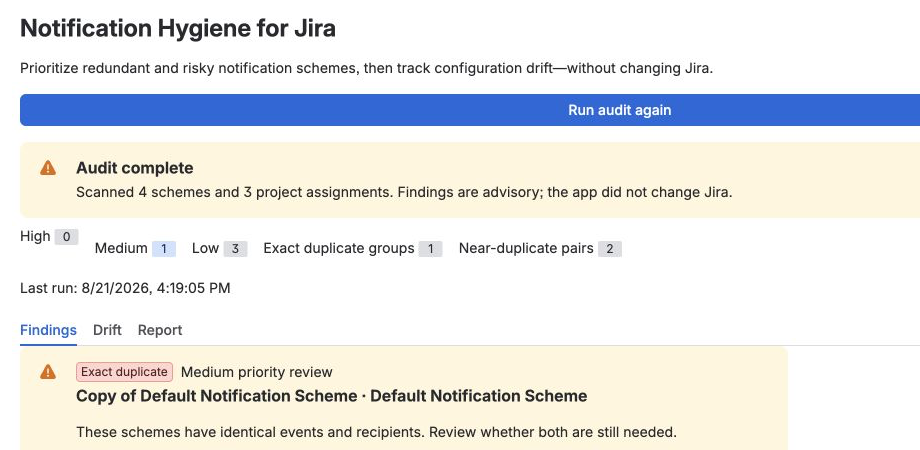
Open the app and select Run audit. A successful run reports the number of schemes and company-managed project assignments reviewed, groups findings by priority, and creates the initial drift baseline.
Review findings safely
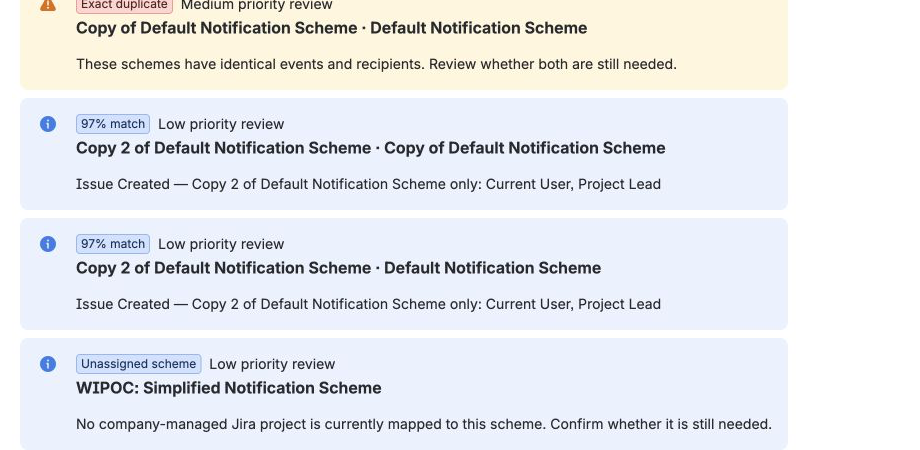
Use the Findings tab to inspect exact duplicates, near matches, recipient risks, and schemes without company-managed project assignments. Near-match results identify added or removed events and recipients so an administrator can decide whether the difference is intentional.
- Exact duplicates: schemes with equivalent event and recipient configuration.
- Near duplicates: similar schemes with recipient- or event-level differences.
- Configuration risks: inactive users, direct-email recipients, or duplicate recipient rows.
- Unassigned schemes: schemes with no company-managed project assignment.
Understand daily drift monitoring
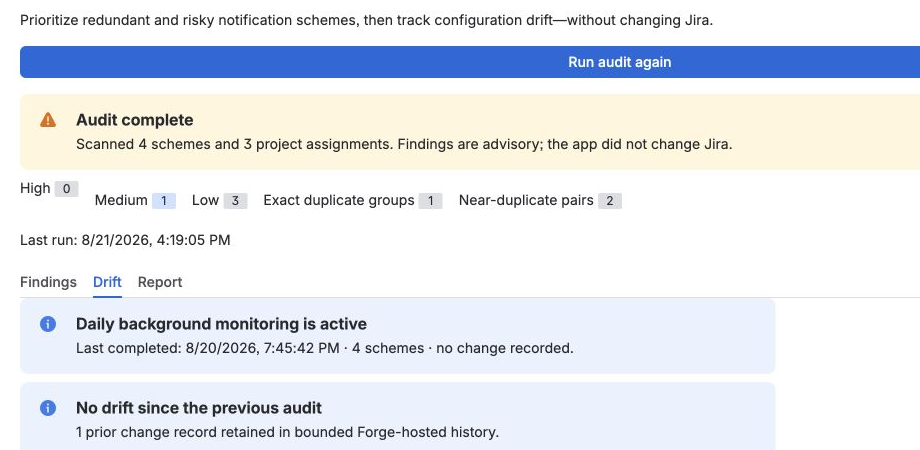
Forge runs a compact scan approximately once per day. The scan compares notification-scheme fingerprints with the saved baseline and records only the scheme IDs and names needed to describe additions, removals, or changes. Forge does not guarantee an exact execution time, so the first scheduled result can take time to appear after installation or upgrade.
Copy a report or reset stored history
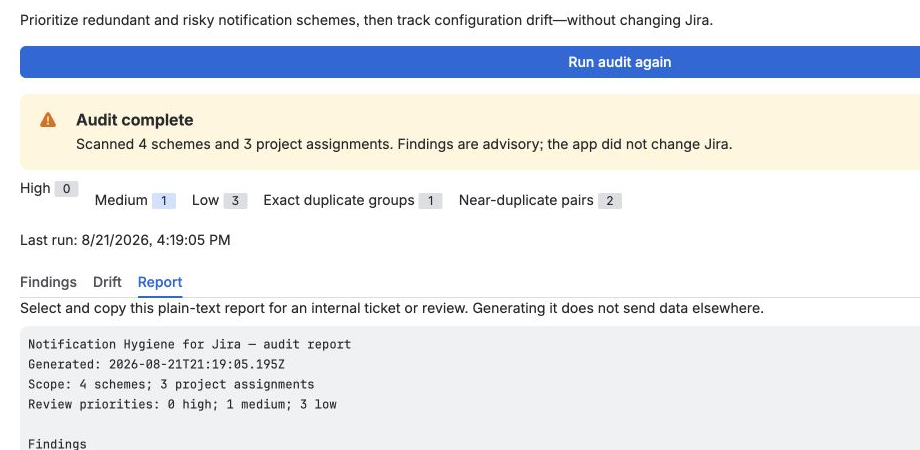
The Report tab provides a deterministic plain-text summary for an internal review or change record. Copying happens in the browser and does not send the report to Korinvale. To delete the app's retained baseline and history, choose Reset drift history and confirm. The next successful licensed audit or scheduled scan creates a new baseline.
Troubleshooting
The app cannot complete an audit
Confirm that you are signed in as a Jira administrator and can administer notification schemes. Refresh Jira and try again. For a rate-limit or temporary Jira service error, wait briefly before retrying; the app stops safely and does not change Jira.
The daily scan has not appeared
Allow time for Forge's first daily invocation, then reopen the Drift tab. Scheduled triggers do not run at a customer-selected clock time.
The license or evaluation is inactive
Audits and scheduled monitoring stop. Reset drift history remains available so retained baseline and history data can still be deleted.
Still need help?
Email support@korinvale.com with the app version, approximate failure time and time zone, the visible error category, and minimal reproduction steps. Do not send passwords, API tokens, recovery codes, or full notification-scheme exports.
Advisory and read-only
The app never edits a notification scheme, project assignment, recipient, or Jira setting. Administrators review the findings and decide whether any Jira change is appropriate.
Trust by design
- Interactive audits use the signed-in Jira administrator’s permissions.
- Daily scans run inside Atlassian Forge as the installed app.
- UI, compute, and bounded drift storage remain in Forge.
- No external backend, database, analytics, advertising, or AI service.
- No Atlassian passwords or API tokens are requested or stored.
Product boundaries
The app does not remediate Jira configuration, guarantee detection of every possible notification risk, measure actual email volume, automatically reduce emails, send external alerts, or export CSV or PDF files.